
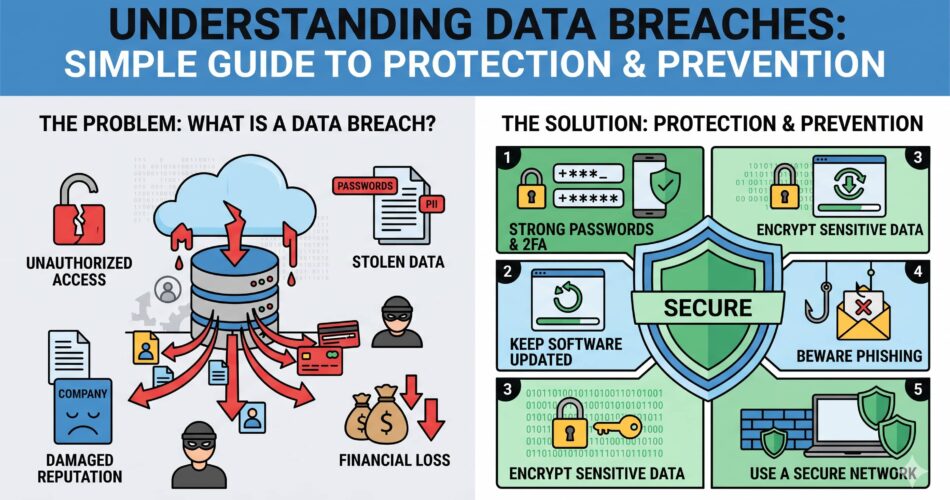
You've probably heard the term “data breach” in the news, but what does it really mean? Think of it like a digital break-in where someone gets access to information they shouldn't have. Just like a burglar might steal jewelry or cash from your home, cybercriminals can steal personal information from companies' computers.
The good news is that understanding data breaches doesn't require a computer science degree. Let's break it down in simple terms that anyone can understand.
Who's Behind Data Breaches? (The “Who”)
Just like there are different types of thieves in the real world, there are different types of people who cause data breaches:
Outside Intruders
- Cybercriminals – These are like digital burglars who break in to steal valuable information they can sell or use for money.
- Government Spies – Sometimes governments sponsor hackers to gather information from other countries or companies.
- Hacktivists – These are protesters who break into systems to make a political or social point.
- Business Rivals – Occasionally, companies try to steal secrets from their competitors.
Inside Jobs
Sometimes the threat comes from within the organization itself:
- Disgruntled Employees – Workers who are angry or leaving might try to take information as revenge.
- Careless Workers – Most insider breaches happen by accident – like leaving a laptop in a café or sending sensitive info to the wrong person.
- Compromised Accounts – When someone's login gets stolen, criminals can use it to pretend to be that person.
How Do Breaches Happen? (The “How”)
Understanding the methods helps us see why certain protections work:
Technical Hacks
These involve exploiting weaknesses in computer systems:
- Software Vulnerabilities – Like leaving a window unlocked in your house, outdated software can have weaknesses that hackers exploit.
- Malware – Malicious software that sneaks onto computers (like viruses) to steal information or cause damage.
- Password Attacks – When hackers guess or steal passwords to gain access.
Tricking People (Social Engineering)
Often, it's easier to trick a person than to break through a computer's defenses:
- Phishing Emails – Fake emails that look real but try to get you to click bad links or give up passwords.
- Phone Scams (Vishing) – Calls pretending to be from your bank or tech support asking for information.
- Text Message Scams (Smishing) – Similar to phishing but through SMS texts.
- Baiting – Leaving infected USB drives in public places hoping someone will plug them in.
Other Common Methods
- Ransomware – Malware that locks up your data and demands payment to unlock it.
- Physical Theft – Stealing laptops, phones, or documents that contain sensitive information.
- Cloud Mistakes – Accidentally leaving digital storage open to the public (like forgetting to lock a filing cabinet).
- Supply Chain Attacks – Breaking in through a trusted vendor or software update (like a burglar getting a key from the building manager).
Why Do Breaches Happen? (The “Why”)
Understanding motivation helps explain what attackers are after:
For Money
Most breaches are financially motivated:
- Stealing credit card numbers to make fraudulent purchases
- Getting personal information to commit identity theft
- Using ransomware to extort money from victims
- Stealing business secrets to gain competitive advantage
For Spying
Some breaches are about gathering information:
- Governments seeking political or military intelligence
- Companies looking for trade secrets or business strategies
- Gathering information about individuals for targeted attacks
For Causes or Fun
Some attackers have different motivations:
- Hacktivists promoting social or political causes
- People seeking revenge against an organization
- Hackers wanting to prove their skills or cause disruption
What Kind of Information Gets Stolen?
Different breaches target different types of data:
Your Personal Information
This is what most people worry about:
- Direct Identifiers – Things that uniquely identify you like your Social Security number, driver's license, or passport number.
- Contact Information – Your name, address, phone number, and email address.
- Biometric Data – Fingerprints, facial recognition data, or iris scans (increasingly used for phone unlocking).
Financial Information
What criminals love to steal for immediate profit:
- Credit and debit card numbers with security codes
- Bank account information
- Investment and retirement account details
- Insurance policy information
Health Information
Particularly sensitive and protected by special laws:
- Medical records and health history
- Prescription information
- Lab test results
- Mental health treatment records
Other Valuable Data
- Usernames and passwords for various accounts
- Intellectual property like secret recipes or software code
- Business plans and strategies
- Customer lists and purchasing history
New Trends in Data Breaches
Just like criminals develop new techniques, data breach methods evolve:
Double and Triple Extortion
Modern ransomware doesn't just lock your data – it also threatens to leak it online unless you pay extra. Some attackers even add DDoS attacks (overwhelming websites with traffic) as a third threat.
Supply Chain Attacks
Instead of attacking a well-defended company directly, hackers target less secure vendors or software providers that have access to many companies. It's like breaking into a security company to get keys to all their clients' buildings.
Living Off the Land
Sophisticated attackers use legitimate system tools already on your computer (like PowerShell or Windows Management) to avoid detection by antivirus software – similar to a burglar using tools they find in your garage rather than bringing their own.
Fileless Malware
Some attacks run entirely in your computer's memory without installing files, making them harder for traditional antivirus to detect.
AI-Powered Attacks
Artificial intelligence is being used to create more convincing phishing emails, automate password guessing, and even help find vulnerabilities in systems.
How Bad Can a Breach Be?
Breaches vary widely in their impact:
Small Breaches
These might affect fewer than 1,000 people and involve less sensitive information. While still serious, they typically cause limited harm.
Medium Breaches
Affecting thousands to hundreds of thousands of people with some sensitive data exposed. These require notification to affected individuals and may result in some regulatory attention.
Major Breaches
Impact hundreds of thousands to millions of people with highly sensitive information like Social Security numbers or health records. These often result in significant fines, lawsuits, and lasting reputational damage.
What Can You Do to Protect Yourself?
While you can't prevent breaches at companies you do business with, you can minimize your risk:
- Use Strong, Unique Passwords – Don't reuse passwords across different sites. Consider using a password manager.
- Enable Two-Factor Authentication – This adds an extra step beyond just a password, like a code from your phone.
- Be Skeptical of Unexpected Messages – If you get an unexpected email, text, or call asking for information or urging urgent action, verify it through official channels.
- Monitor Your Accounts – Regularly check bank and credit card statements for unauthorized activity.
- Check Your Credit Reports – Look for accounts you didn't open or inquiries you don't recognize.
- Limit What You Share – Only provide necessary information when signing up for services.
- Keep Software Updated – Update your phone, computer, and apps regularly to patch security weaknesses.
- Be Careful with Public Wi-Fi – Avoid accessing sensitive accounts on unsecured public networks.
The Bottom Line
Data breaches are a reality of our digital world, but understanding them helps you navigate it more safely. Remember that:
- Most breaches aren't targeting you specifically – you're often caught up in a larger attack on a company you use.
- Companies have legal obligations to protect your data and notify you if it's compromised.
- Your personal vigilance makes a real difference in protecting your information.
- If you do become a victim of identity theft from a breach, there are resources and recovery processes available.
- By staying informed and practicing good digital hygiene, you can significantly reduce your risk and respond effectively if your information is ever involved in a breach.
Quick Protection Checklist:
- Use a password manager to create and store unique passwords
- Enable 2FA on all important accounts
- Keep all software and devices updated
- Be cautious with email links and attachments
- Monitor financial accounts regularly
- Check credit reports quarterly
- Use a VPN on public Wi-Fi
- Backup important data regularly